
Artificial intelligence is rapidly changing how individuals and teams research information, generate ideas, manage projects, and create content. While many AI tools focus on simple chatbot interactions, a new generation of platforms is designed to support deeper thinking, visual workflows, and collaborative knowledge management. Flowith is one such platform, aiming to help users move beyond linear conversations and build more dynamic AI-assisted workspaces.
Flowith is an AI-powered productivity and research platform that combines advanced language models with a visual canvas interface. Instead of relying solely on a traditional chat window, Flowith enables users to organise ideas, conduct research, brainstorm concepts, generate content, and manage complex projects using interconnected workflows. Designed for students, researchers, creators, entrepreneurs, and professionals, the platform focuses on making AI-assisted work more structured and efficient.
In this Flowith Review, we’ll explore the platform’s features, usability, AI capabilities, collaboration tools, website experience, pricing, customer support, and overall value to help you decide whether Flowith is the right AI workspace for your needs.
About Flowith
Flowith was developed to create a more flexible way of working with artificial intelligence. Rather than limiting users to one conversation at a time, the platform introduces a visual workspace where multiple AI interactions, notes, references, and ideas can exist together.
This approach makes it easier to organise complex research projects, compare information, develop long-form content, and manage creative workflows without losing context.
The platform serves a broad audience, including writers, marketers, students, consultants, researchers, developers, and business teams.
What Makes Flowith Different?
Flowith distinguishes itself by combining conversational AI with a visual knowledge workspace.
Its core features include:
- AI-powered research assistance
- Visual canvas workspace
- Content generation
- Brainstorming tools
- Multi-thread AI conversations
- Knowledge organisation
- Project planning
- Document creation
- Workflow management
- Collaboration features
Instead of switching between multiple documents and chat sessions, users can manage entire projects within a single interactive workspace.
AI Workspace and Visual Canvas
One of Flowith’s standout features is its visual canvas.
Rather than displaying conversations in a single vertical thread, the platform allows users to create multiple connected AI interactions across a workspace.
This makes it easier to:
- Explore different ideas simultaneously
- Organise research topics
- Compare responses
- Build structured workflows
- Connect related concepts
- Manage larger projects
For users handling complex tasks, this visual organisation can improve clarity and reduce the need to revisit previous conversations repeatedly.
AI Writing and Content Creation
Flowith supports a wide variety of writing tasks.
Users can generate:
- Blog articles
- Marketing copy
- Social media content
- Business reports
- Research summaries
- Product descriptions
- Emails
- Creative writing
- Presentation outlines
The platform also helps refine drafts, improve structure, expand ideas, and edit existing content, making it useful throughout the writing process rather than only at the beginning.
Research and Knowledge Management
Flowith is particularly valuable for research-intensive work.
Users can:
- Collect information
- Organise sources
- Summarise complex topics
- Build research maps
- Develop project plans
- Connect related concepts
- Maintain structured knowledge bases
Its workspace encourages users to think visually, which can be especially beneficial for long-term projects involving multiple sources and evolving ideas.
Collaboration Features
Flowith also supports collaborative work.
Depending on the workspace configuration, teams can:
- Share projects
- Collaborate on research
- Organise shared knowledge
- Review AI-generated content
- Coordinate brainstorming sessions
- Manage collaborative workflows
These features make the platform suitable for both individual users and teams working on creative or analytical projects.
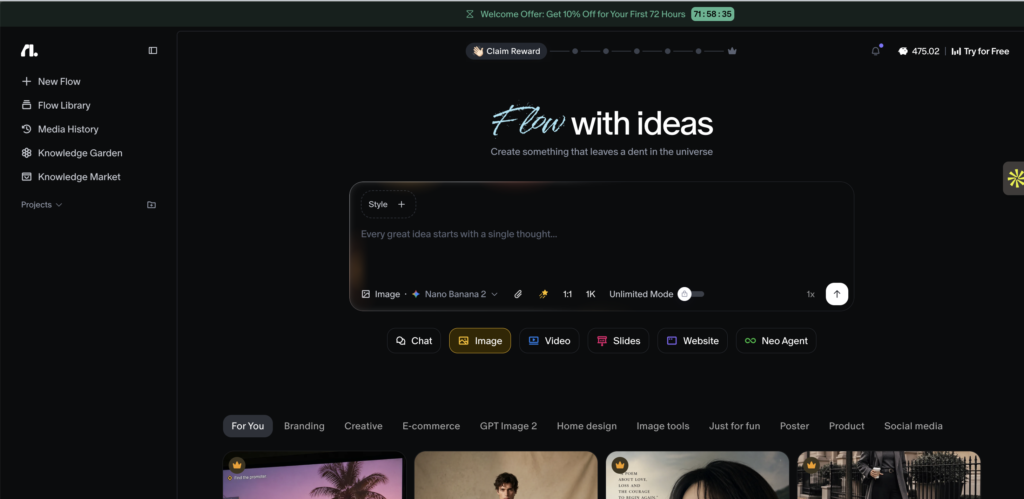
Website Experience
The Flowith website is modern, intuitive, and designed to introduce visitors to the platform’s visual workflow concept.
Visitors can:
- Learn about the platform
- Explore features
- View demonstrations
- Create an account
- Compare plans
- Access documentation
- Read educational resources
The responsive design works smoothly across desktops, tablets, and mobile devices, although the full visual workspace experience is best suited to larger screens.
Customer Support
Flowith provides customer support through its online resources and support channels.
Users can typically access assistance for:
- Account management
- Platform navigation
- Technical issues
- Billing enquiries
- Feature guidance
- Workspace setup
- General customer support
Documentation and onboarding resources also help new users become familiar with the platform’s unique interface.
Pricing and Overall Value
Flowith offers different pricing options designed to accommodate varying levels of usage, from individuals exploring AI-powered productivity to professionals and teams managing larger projects.
The platform’s value comes from:
- Innovative visual workspace
- AI-assisted research
- Content generation
- Project organisation
- Multi-thread workflows
- Knowledge management
- Team collaboration
- Continuous workflow support
For users who frequently work on complex research or content projects, these capabilities may provide greater long-term value than traditional chat-based AI tools.
Who Should Use Flowith?
Flowith is particularly suitable for:
- Researchers
- Students
- Writers
- Content marketers
- Consultants
- Entrepreneurs
- Product managers
- Designers
- Business teams
- Knowledge workers
It is especially useful for anyone managing projects that require multiple ideas, references, and AI conversations to remain organised in one place.
Is Flowith Worth It?
Whether Flowith is worth using depends on your workflow.
If you only need occasional AI assistance for simple questions or short writing tasks, a standard chatbot may be sufficient.
However, if your work involves extensive research, long-form writing, strategic planning, or managing interconnected ideas, Flowith offers a more structured and scalable approach. Its visual canvas, AI-powered organisation tools, and collaborative capabilities make it particularly attractive for professionals who want to integrate AI into their everyday knowledge work.
Final Verdict
Flowith has established itself as an innovative AI productivity platform by rethinking how people interact with artificial intelligence. Its visual workspace, flexible project organisation, AI-assisted research, and collaborative features provide a refreshing alternative to traditional linear chat interfaces.
The intuitive website, thoughtful onboarding experience, and feature-rich platform contribute to an efficient workflow for creators, researchers, and professionals alike. Whether you’re developing content, analysing information, brainstorming new ideas, or managing complex projects, Flowith provides tools that help organise both your thinking and your work.
Overall, this Flowith Review finds that the platform offers excellent value for users seeking a more visual, structured, and collaborative AI experience. If you’re looking to move beyond conventional AI chat tools and build smarter research and creative workflows, Flowith is well worth considering.